Posts

Swift 'for' loop with enumerated() and zip()

'for' loop is used every where in programming languages as the part of Control flow statements. Consider names of few users, I have initialized them below. let names = [ "John" , "Fred" , "Maria" , "Rose" ] Simple for Loop A simple 'for' loop iterating through the items is listed below. for var i = 0 ; i < names.count; i++ {     print( "Name= \ ( names[i] )" ) } This will result in compile time error in Swift 3 onwards. Below is the compile time error " C-style for statement has been removed in Swift 3 " So, lets correct it now and use a much shorter syntax. for item in names {     print ( "Name = \ ( item )" ) } Output: Name = John Name = Fred Name = Maria Name = Rose for Loop with Counter Now what if I want the counter to be also accessible within the same loop. That counter can be used to perform some operation , let's say a...

Use Swift Class in Objective C

Image
Sometimes we would like to include the Code written in the Swift Language to be used in Objective-C file. Recently, I ran into a situation where I need to use my Swift written code into Objective-C .m file. Before we start this, we need to understand @objc . It's an attribute which helps the swift code interoperability with Objective-C code. Consider the below code: class User : NSObject {     init ( _ nameId: Int ) { }     init ( _ name: String ) { } } Here, the 'User' can be initialized by nameId or name, but Objective-C does not understand this short hand implementation. It would not know which initialization to call , one with nameId or one with just  name. class User : NSObject {     @objc(initWithNameID:) init ( _ nameId: Int ) { }     @objc(initWithName:) init ( _ name: String ) { } } The Objective-c code will now know there are two initialization methods, one initWithNameID  ...

Variadic Parameters in Swift

Image
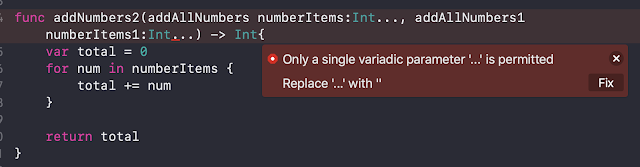
Variadic Parameters allows us to specific 'n' number for parameters to a function. This could be useful in scenarios where input count is unknown. ex: Addition of all numbers. Below is a simple function implementation in Swift . func addNumbers(addAllNumbers numberItems: Int ...) -> Int {     var total = 0     for num in numberItems {         total += num     }          return total } addNumbers (addAllNumbers: 1 , 2 , 3 ) The answer this would be 6. Here we don't have to pass a array of Int, instead of that we pass input's as if there are multiple parameters (not inputs are ',' separated). Now one important question arises here, Can a function have more than one variadic kind of parameter?  Answer to this is NO. There can be only one and only one variadic parameter. Try to that and you will get the compile time error, as shown below. ...

NSPredicate with Swift.

Image
With NSPredicate in Objective-C it was easy to filter the NSARRAY and get the desired results ex: In the Array for Food items, if we want to filter results which has food item's having 'ice' in the foodName. And with Swift it's even getting simpler , with the use of filter method. With recent version of Swift, the use of NSPredicate is discouraged. Currently with Swift 4.0 the following code fails, but it could work in earlier versions of swift. Let me explain it to you with simple NSPredicate used along with Swift.   let foodArray = [ Food (foodId: "1" , foodName: "Pizza" , spiceLevel: 5 ),                          Food (foodId: "2" , foodName: "Pasta" , spiceLevel: 4 ),                          Food (foodId: "3" , foodName: "IceCream" , spiceLevel: 0 ),                      ...

Swift - Optional Protocol Implementation

Image
In my previous blog, I explained the Protocol and optional protocol in a generic way. Now, we will dive deep into Protocol implementation and may be this is how the UITableViewDataSource and UITableViewDelegate would have been implemented. Objective's of this document would be to understand the optional protocol following concepts 1) Check implementation of the optional method by writing ? , after the name of the method. 2) When a method is optional it's type automatically becomes as optional. example type (Int) -> String becomes (Int) -> String? _________________________________________________________________________________ Lets start with a controller implementation , listed in the below code. There will no UI re-presentation , the protocol explanation is solely for simple understanding. 1)  ProfileViewsDelegate.swift. We will be implementing the protocol for the ProfileViews.swift. import Foundation import UIKit @objc protocol Profile...

Swift Protocol and Implementation

Image
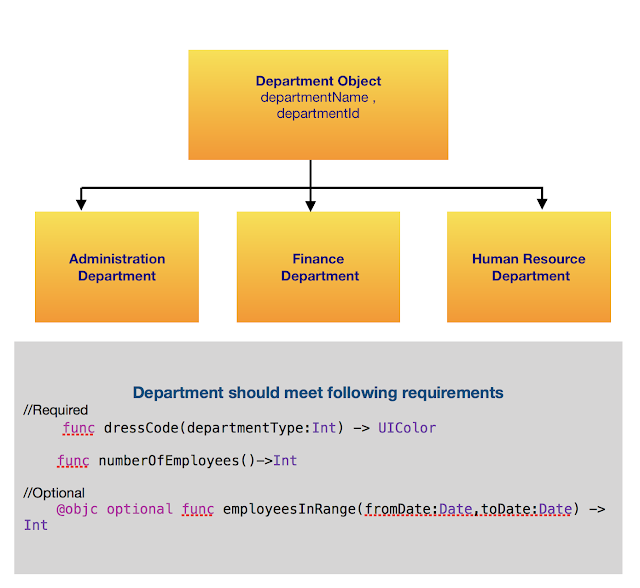
Protocols in Swift , define requirements that has to be implemented by a Class adopting or conforming to it. Protocols can be adopted by a Class , Structure or Enumeration , all of which can actually implement them based on the requirements. But, in one scenario you can't adopt protocol for Structure and Enumeration. Please go through the entire article for further understanding. Lets consider a simple example with Inheritance and Requirement (Protocol defines Requirements). Object Inheritance. Department Object is inherited by Administration , Finance and Human Resource Department. So all the departments will have inherited properties like departmentName and departmentId. Protocol. Protocol define the requirements. These requirements can be required or optional.  requirements If you notice in the design listed below, you will notice two type's for requirements. 1) Required  func dressCode(departmentType: Int ) -> UIColor func number...

How to set Status Bar in iOS?

Image
Setting the  UIStatus Bar Style   is very simple in iOS. Below is how it looks like with lightContent Style and the Default Style. Based on the app. UIView backgroundColor, you can set the way a status bar should appear. There are two ways to achieve this. The first one being the recommended one since iOS 7. For this one would have to make changes in Info.plist. 1) In iOS 7 onwards, you can specify the bar style per view controller. For this the value for Key UIViewControllerBasedStatusBarAppearance in info.plist should be set to YES . Now in your controller you should override a property  preferredStatusBarStyle  as coded below.     override var preferredStatusBarStyle: UIStatusBarStyle {         get {             return . lightContent         }      } Changing the return to .default will give you dark status bar style. ...

Swift Class versus Structure

In Swift Just like classes play a important role , Structure do play a important role. What could be the notable difference? First one is Structure is pass by value and Classes are pass by reference.  Below is a simple example to understand the meaning of it. func getAddress( _ object: Any )-> String {     var newObject = object     var address: String = String ( "Could Not CalculateAddress" )     withUnsafePointer (to: &newObject) {                  address = " \ ( $0 )"     }     return address } func getAddressForClass( _ object: AnyObject ) -> Any {     return Unmanaged < AnyObject >. passUnretained (object). toOpaque () } //Structure struct User{     var name: String     var userId: Int } func changeStructuredValue( _ inputStruct: User ){     var newI...

CMTimeMakeWithSeconds explained

Image
CMTime  is structure which has two main components,  timeScale  and  value. CMTIME = VALUE  / TIMESCALE where, TimeScale =  fraction of a second each unit in numerator occupies. CMTIME = Value / TimeScale 1)  public   func  CMTimeMake( _  value:  Int64 ,  _  timescale:  Int32 ) ->  CMTime CMTimeMake ( 6000 ,  10 ) Means, there are 6000 units , each unit occupies 1/10 of a second 2)  public   func  CMTimeMakeWithSeconds( _  seconds:  Float64 ,  _  preferredTimescale:  Int32 ) ->  CMTime CMTimeMakeWithSeconds(10.0,500) 10.0 = VALUE /500 Therefore VALUE = 5000 So, there are 5000 units, each occupy 1/500 of a second