Posts

Understanding Property Wrappers Swift

Property Wrappers Property wrappers in swift help us to separate the code that manages the validation and the code that actually defines it. Code that defines the property var   userId :  Int Code that manages the storage @ UserIdentifier var   userId : Int @ UserIdentifier  is a custom way to manage the storage. Don't worry it will be more clear in some time, but my whole point was to clear the understanding on the difference between defining and managing a property (with the help of Property Wrapper).  Consider a use case of UserIdentifier: We want to have a userId which can take maximum up to 100 ids. If a user tries to set it to a value more than 100, it won't allow Provide a validation flag if value exceeds then 100. i.e true if any adjustments made or else false.  Think of this validation to be added at 5 different properties of different class . It would be very difficult to manage , may be write extension to handle this.  extension Int ...
Swift Map , Filter , Reduce

Swift Map , Filter , Reduce Higher order function as defined in computer science , does at-least one of the following: 1. returns a function as a result 2. takes one or more functions as arguments. Objective-C does not have direct support for higher order functions, but Swift has, which is good. There are several examples of higher order functions, some of them are map, filter , reduce  . Let's check them out with Swift. Map Definition: " Returns an array containing the results of mapping the given closure over the sequence’s elements. " So we know now , map always returns an Array. Example: Apply an offset of 10 to userIndexes. let userIndexes = [11,12,13,14] let offsetUserIndexes = userIndexes . map { (userIndex) -> Int in     return 10 + userIndex } let offsetUserIndexes = userIndexes . map { (userIndex) -> Int in     return 10 + userIndex } Output: [21, 22, 23, 24] Here, we pass a...

enum in Swift of Type String

enum in Swift of Type String Many a times we would like to use enum to store text value's or may be even better to store fixed messages. Like in below case ,  we are creating a enumeration called "StringMessages" and "raw Values" are defined to be of Type "String"     enum StringMessages : String {        case emptyText = "InputText is Empty"        case nonEmptyText = "Input Text is not Empty"    } The only requirement here is the Raw Value should be unique. Raw Values can be String , characters , integer or floating point number types. Raw Values of this enum can be accessed using StringMessages.emptyText.rawValue or StringMessages.nonEmptyText.rawValue.

Attributes in Swift @available

Image
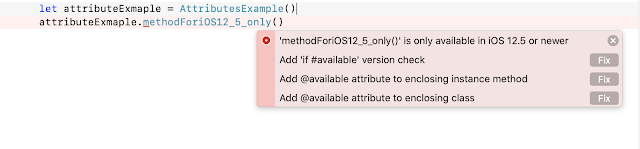
Attributes in Swift In Swift Attributes are used to provide some kind of additional information to a declaration or a type. For example if I want a function to be just available for iOS 12 version onwards. The Swift compiler will give warnings in such cases and provides suggestion to fix it as shown below. You can download the example for it from GitHub How do we declare an attribute? Attribute declaration starts with " @ " symbol and can also arguments which is enclosed in parentheses. Arguments specify some more information on how it applies to the existing attribute declaration. @ attributename ( attributearguments ) Example:  Here we have used attribute available and also gave more information on how it applies to the declaration , in this case it's only for iOS platform and available from12.5 version onwards.     @available (iOS,introduced: 12.5)     func methodForiOS12_5_only () {         ...

Decorator Design Patter Using Swift

Decorator Design Pattern It allows you to add behavior to an individual object. It helps to add such behavior changes, dynamically without affecting the behavior of the other objects from the same parent class. Decorator design pattern strong holds to Single Responsibility principle. i.e a Base concrete Object. It is somewhat similar to chain or responsibility design pattern (ex: UIViewController,UIView) where exactly one of the class handles the responsibility, ex: touch events to UITextField, the iOS infrastructure tries to find the responder who can respond to it, if you have implemented a delegate or a IBAction change event , it is directed to that root UIView -> UIViewController -> UIWindow -> UIApplication. In case of the Decorator Design pattern all classes handle the request which we will see in the example listed below. A simple example to understand with this would be creating a "Simple Coffee" object and "Coffee Latte". I will try ...